

Building a Modern Jenkins CI/CD Pipeline
Learn how I built a real Jenkins CI/CD pipeline using Spring Boot, Docker, SonarQube, OWASP, Testcontainers, and k6 performance testing.
Introduction
Modern software development is about much more than writing code. Every change should be built, tested, analyzed, and deployed in a reliable and repeatable way. As projects grow, manual deployment quickly becomes time-consuming and error-prone.
When I started building this platform, I wanted every code change to pass through the same automated process. That meant every build would follow identical quality checks before reaching production.
After evaluating different automation tools, I chose Jenkins.
Instead of manually building, testing, and deploying my applications, I wanted a fully automated CI/CD pipeline that guarantees consistent results every time.
⚙️ Why CI/CD Matters
Many developers think Jenkins is simply a build server.
In reality, a modern CI/CD pipeline automates the entire software delivery process.
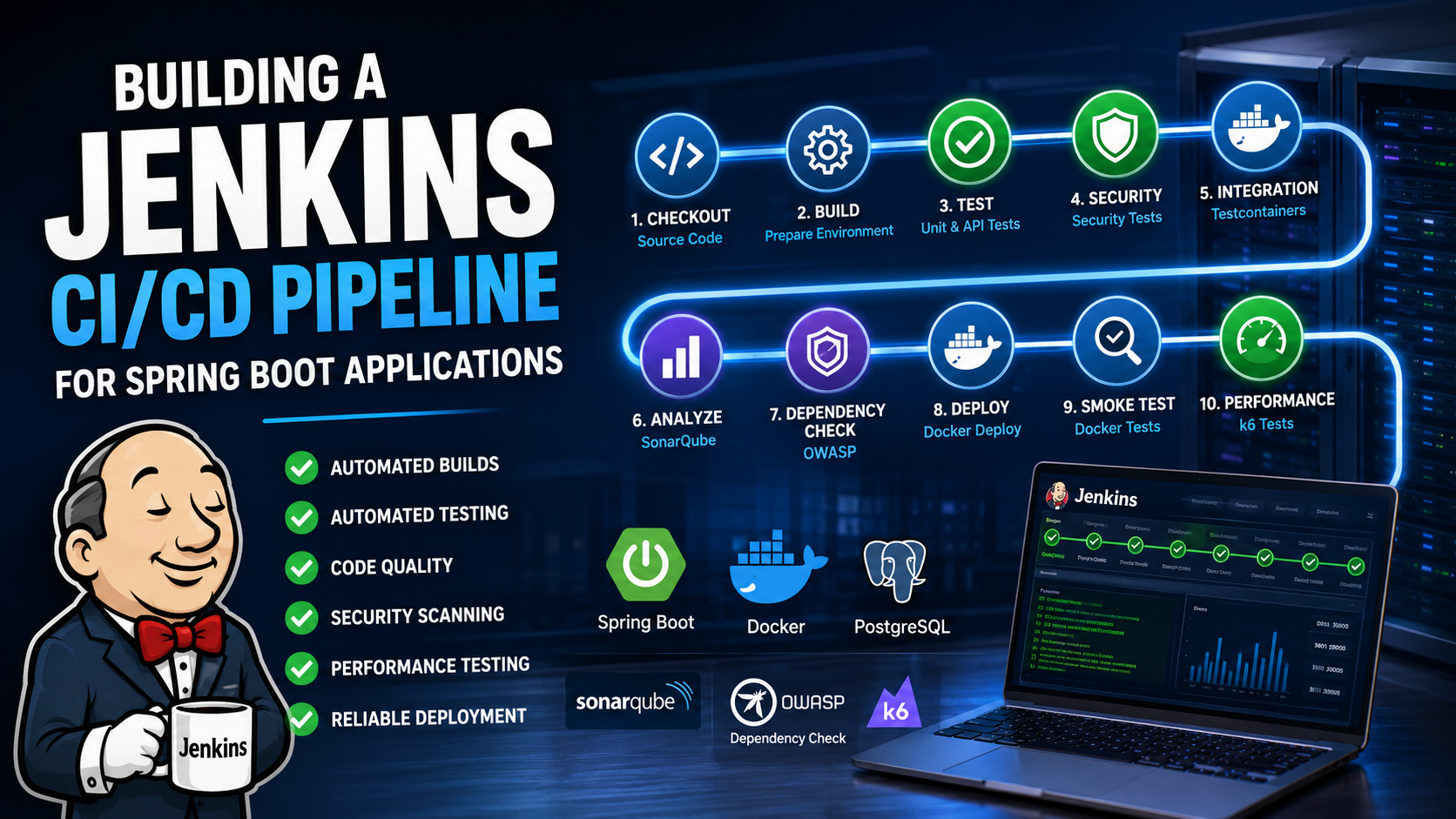
A production-ready pipeline typically includes:
✅ Source Code Checkout
🔨 Application Build
🧪 Unit Testing
🌐 API Testing
🔒 Security Testing
🐳 Integration Testing with Testcontainers
📊 Static Code Analysis
🛡️ Vulnerability Scanning
🚀 Deployment
📈 Performance Testing
📋 Test Reporting
Every stage helps identify problems earlier—when they're easier and less expensive to fix.
🏗️ Why I Chose Jenkins
There are many CI/CD solutions available today, including GitHub Actions, GitLab CI, Azure DevOps, and CircleCI.
I chose Jenkins because it gives me complete control over the entire pipeline.
It allows me to:
✅ Build complex multi-stage pipelines
✅ Integrate almost any development tool
✅ Run everything inside Docker
✅ Deploy to my own infrastructure
✅ Extend functionality through hundreds of plugins
Most importantly, Jenkins fits perfectly into my self-hosted architecture.
Instead of depending on a cloud service, I own and control the entire automation process.
🔄 My Development Workflow
Every change follows exactly the same workflow. |
👨💻Development |
⬇️ |
🐳 Local Docker Environment |
⬇️ |
🧪Manual Verification |
⬇️ |
⚙️Jenkins Pipeline |
⬇️ |
✅Quality & Security Checks |
⬇️ |
🚀 Production Deployment |
Nothing reaches the production server unless every automated check has passed successfully. 🏭 Inside My Jenkins Pipeline. My pipeline consists of several independent stages. Each stage has one clearly defined responsibility.
Pipeline Stages
1️⃣ Download Source Code
2️⃣ Prepare Build Environment
3️⃣ Unit Tests
4️⃣ API Tests
5️⃣ Security Tests
6️⃣ Integration Tests
7️⃣ Build Spring Boot Application
8️⃣ SonarQube Analysis
9️⃣ SonarQube Quality Gate
🔟 OWASP Dependency Check
1️⃣1️⃣ Local Docker Deployment
1️⃣2️⃣ Docker Smoke Tests
1️⃣3️⃣ Performance Tests with k6
1️⃣4️⃣ SpotBugs Static Analysis
1️⃣5️⃣ JaCoCo Test Coverage
Every stage acts as another quality gate before the software moves forward.
🔍 Quality Before Deployment
One of the biggest advantages of Jenkins is that quality isn't checked only at the end.
It's verified continuously throughout the pipeline.
The pipeline automatically validates:
🧪 Functional correctness
🔒 Application security
📊 Code quality
📈 Performance
📚 Test coverage
📦 Build artifacts
Only when every stage succeeds does Jenkins continue to deployment.
🐳 Docker Everywhere
Docker plays a major role in my development workflow.
The same containerized environment is used throughout development, testing, and deployment.
That provides several important benefits:
✅ Reproducible environments
✅ Consistent builds
✅ Easy deployment
✅ Simplified maintenance
Because every service runs inside Docker containers, the behavior is nearly identical across development, testing, and production.
🧪 Testcontainers for Integration Testing
Integration testing requires realistic environments.
Instead of maintaining local databases and supporting services, I use Testcontainers.
For every test run, Docker automatically starts the required services, including PostgreSQL and other dependencies.
Once testing is complete, everything is removed automatically.
This guarantees:
✅ Clean test environments
✅ Fully isolated tests
✅ Reproducible results
✅ No manual setup
📊 Code Quality with SonarQube
Code that compiles isn't necessarily good code.
That's why Jenkins automatically integrates with SonarQube.
Every build is analyzed for:
🐞 Bugs
🔒 Security Vulnerabilities
⚠️ Code Smells
📄 Duplicate Code
📊 Test Coverage
The Quality Gate ensures that only code meeting predefined quality standards continues through the pipeline.
🛡️ Security Comes First
Security is integrated directly into the pipeline.
OWASP Dependency-Check scans every third-party library for known vulnerabilities.
SpotBugs performs static code analysis to detect programming mistakes before they become production issues.
Security isn't something added later.
It's verified automatically with every single build.
🚀 Performance Testing with k6
Reliability also means performing well under load.
That's why Jenkins automatically executes performance tests using k6.
The tests simulate multiple virtual users interacting with the API simultaneously.
This allows me to measure:
📈 Response Times
⚡ Throughput
📊 Stability
🚦 System Limits
Performance testing becomes part of every build—not something postponed until the end of the project.
🧩 My DevOps Architecture
ach technology has one clearly defined responsibility.
Component | Responsibility |
👨💻 GitHub | Source Code |
⚙️ Jenkins | CI/CD Automation |
🐳 Docker | Container Platform |
☕ Spring Boot | Business Logic |
🗄️ PostgreSQL | Database |
🔐 Keycloak | Authentication |
📝 Contentful | Content Management |
📊 SonarQube | Code Quality |
🛡️ OWASP | Dependency Security |
📈 k6 | Performance Testing |
This separation keeps the entire platform modular, maintainable, and easy to extend.
🎬 Related Video
Building My Complete Jenkins CI/CD Pipeline
In this video, I walk you through the complete Jenkins pipeline I use for my Spring Boot project.
You'll see every stage—from source code checkout and automated testing to SonarQube, OWASP Dependency-Check, Docker deployment, smoke testing, performance testing with k6, and production-ready quality gates.
Rather than demonstrating a simple example, I explain the real CI/CD pipeline I use to automate builds, improve software quality, strengthen security, and deliver reliable deployments.
🎯 Conclusion
Jenkins has become one of the most important components of my software architecture.Together with Spring Boot, Docker, SonarQube, Testcontainers, Keycloak, PostgreSQL, Contentful, and k6, it creates a fully automated development workflow where every stage has a clear purpose.Instead of manually building and deploying applications, I can focus on what really matters:
🚀 Developing new features
📚 Creating high-quality software
🔒 Building secure applications
⚡ Automating repetitive tasks
📈 Continuously improving the platformTo me,
that's what modern software engineering is all about: building reliable systems, automating everything that can be automated, and delivering software that's ready for production with every successful build.