


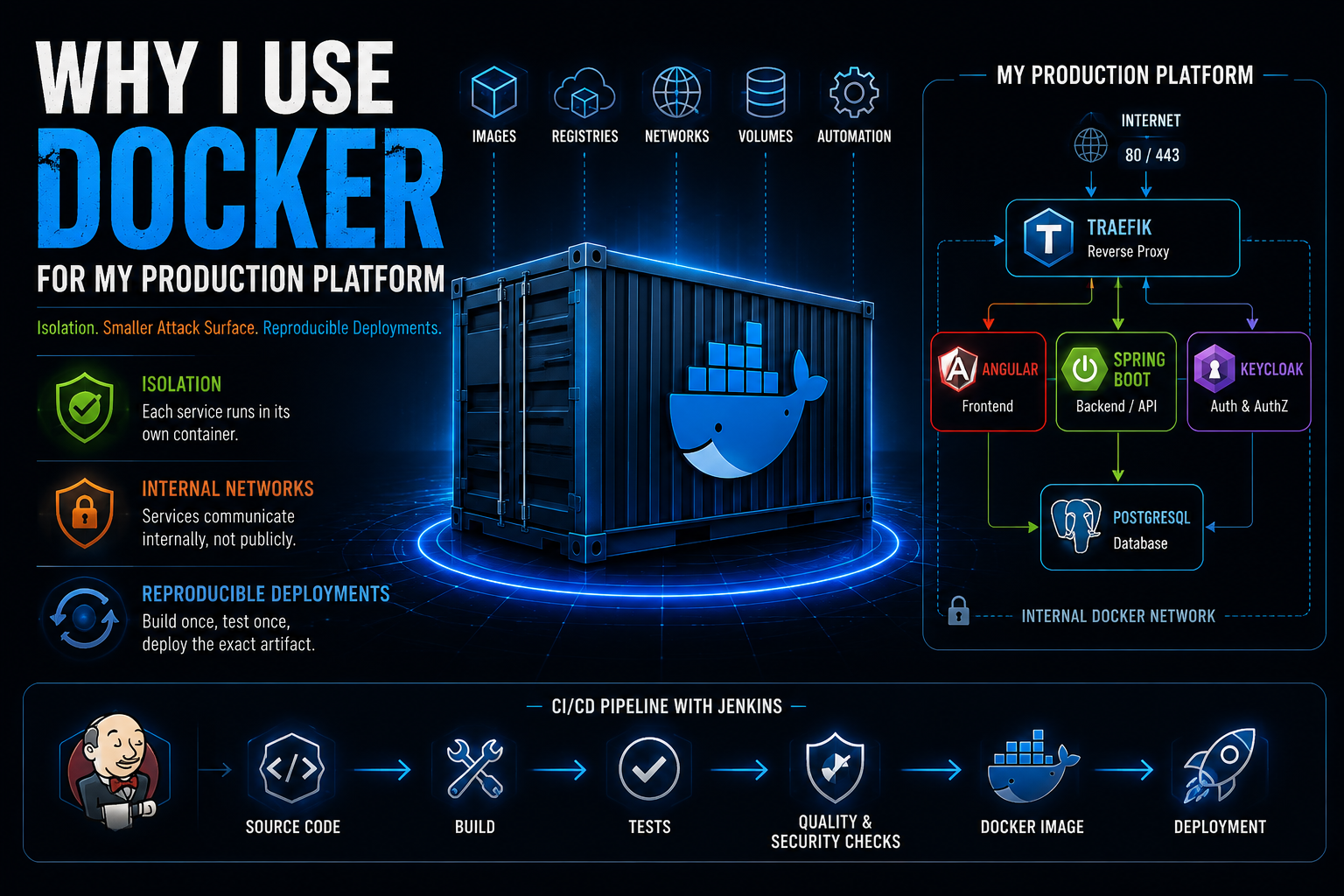
Why I Chose Docker for My Production Platform
Discover why I chose Docker for my production platform and how service isolation, internal networks, a smaller attack surface, reproducible images, and CI/CD integration help me build reliable and maintainable deployments.
Building a Reproducible Production Environment
Docker is everywhere today.
But containers were not invented by Docker.
Long before Docker existed, I was already working with similar concepts such as Solaris Zones and FreeBSD Jails.
So when I chose Docker for my production platform, the decision wasn't based on the idea that containers were something completely new.
What interested me was the complete ecosystem Docker provides.
For my architecture, three things are especially important:
🔒 Isolation
🛡️ A Smaller Attack Surface
🔄 Reproducible Deployments
Together, these characteristics make Docker an important building block of my production platform.
🕰️ Containers Existed Before Docker
The basic idea of isolating processes and applications is much older than Docker.
Solaris introduced Solaris Zones.
FreeBSD has provided Jails for many years.
Both technologies already demonstrated an important architectural principle:
Applications do not necessarily have to share one unrestricted runtime environment.
Docker did not invent this concept.
What Docker did extremely well was make containers practical for modern software development.
Docker provides an ecosystem around:
📦 Images
🏪 Registries
🌐 Networks
💾 Volumes
⚙️ Configuration
🚀 Automated Deployments
This combination makes containers standardized, portable, and easy to integrate into modern development and deployment workflows.
And that is exactly what I need for my platform.
🧩 My Platform Is Not a Single Application
My production platform consists of several components.
🎨 Angular
Responsible for the frontend and user interface.
⚙️ Spring Boot
Responsible for backend services, REST APIs, and business logic.
🔑 Keycloak
Responsible for authentication and authorization.
🐘 PostgreSQL
Responsible for persistent application data.
🌐 Traefik
Responsible for reverse proxying and routing incoming requests.
🐳 Docker
Responsible for providing clearly defined container environments.
These components have different responsibilities and different runtime requirements.
I do not want to install and maintain all of them directly on the host operating system.
Instead, the services run separately in containers.
This creates clear boundaries between the different parts of the platform.
📦 Clearly Defined Environments
Without containers, the production server could gradually become responsible for maintaining many different dependencies.
Java versions.
Application libraries.
Database packages.
Runtime configurations.
Operating system packages.
Manually modified configuration files.
That is exactly the kind of environment I want to avoid.
With Docker, every service gets a clearly defined environment.
My Spring Boot application does not need to care about how PostgreSQL was installed on the host.
Keycloak does not depend on a manually maintained Java installation on the production server.
Dependencies required by different applications are also much less likely to interfere with each other.
The result is a system that is:
🔍 Easier to Understand
🔧 Easier to Maintain
🚀 Easier to Deploy
🌐 Docker Networks
One of the most important Docker features for my architecture is networking.
A service running inside a container does not automatically need to be reachable from the public Internet.
Docker allows me to define internal networks and control which services communicate with each other.
PostgreSQL is a good example.
My Spring Boot backend needs to communicate with PostgreSQL.
The public Internet does not.
Conceptually:
Spring Boot → PostgreSQL :5432 ✅
Internet → PostgreSQL :5432 ❌
There is no reason for me to publish PostgreSQL port 5432 to the outside world.
The database can remain inside the container infrastructure while still being available to the backend.
This principle also applies to other internal services.
🛡️ Reducing the Attack Surface
For a web platform, I want as few public entry points as reasonably possible.
Typically, incoming web traffic uses:
🌐 Port 80 — HTTP
🔒 Port 443 — HTTPS
In my architecture, Traefik sits in front of the application.
Incoming requests reach Traefik first.
Traefik then routes those requests to the appropriate service inside the container infrastructure.
The databases and other internal components do not need to be directly accessible from the Internet.
The principle is simple:
Expose only what actually needs to be exposed.
Reducing unnecessary public services also reduces the externally reachable attack surface of the platform.
🔐 Docker Does Not Automatically Mean Security
This distinction is important.
Just because an application runs inside a Docker container does not automatically make it secure.
A container is also not the same thing as a virtual machine.
Containers normally share the kernel of the host operating system.
Secure container operation therefore still requires additional measures.
For my platform, that includes:
🔄 Keeping Images Updated
📦 Using Small and Well-Maintained Images
👤 Running Processes with Appropriate Permissions
🔑 Managing Secrets Securely
🔍 Performing Security and Vulnerability Scans
🛡️ Hardening the Host Operating System
⚙️ Keeping the Host Updated
Docker is not a replacement for security engineering.
It provides useful mechanisms for separating services and controlling how those services communicate and are exposed.
But the security of the platform depends on how the complete architecture is designed and operated.
That leads to one of the most important principles behind my platform:
Docker itself is not the security architecture.
The architecture is the security.
🔄 Reproducibility Is Just as Important
Security is only one reason why Docker is valuable to me.
The second major advantage is reproducibility.
I do not want to log into my production server and manually install application packages.
I don't want to ask:
Which Java version is installed?
Which library version is running?
Which package was manually updated?
Which configuration file did somebody change six months ago?
Those questions are symptoms of configuration drift.
Instead, I want my deployment artifact to be clearly defined.
📦 The Docker Image Becomes the Artifact
With Docker, my application can be packaged into a versioned image.
That image can be:
🏗️ Built
🧪 Tested
🔍 Scanned
🏷️ Versioned
📦 Stored
🚀 Deployed
The container image becomes a standardized and reproducible deployment artifact.
The production environment does not need to reconstruct the application manually.
Instead, it runs the artifact that has already passed through the engineering process.
This gives me three important guarantees:
I know what I built.
I know what I tested.
I know what I deployed.
🚀 Docker + Jenkins CI/CD
This is where Docker fits directly into my Jenkins CI/CD pipeline.
When I commit new source code, that code does not simply end up on my production server.
The pipeline controls the process.
A simplified workflow looks like this:
💻 Source Code
⬇️
🏗️ Build
⬇️
🧪 Automated Tests
⬇️
🔍 Quality & Security Checks
⬇️
🐳 Docker Image
⬇️
🚀 Deployment
Only after the required checks succeed can the deployment artifact move further through the pipeline.
This creates a controlled path from source code to production.
🧪 Quality Before Deployment
Docker is therefore closely connected to the quality strategy of my platform.
Before an artifact reaches production, my pipeline can perform different checks.
These include:
🧪 Unit Tests
🧪 Integration Tests
📊 Code Quality Analysis
🔐 Dependency Checks
🛡️ Vulnerability Scanning
🐳 Container Image Scanning
🚦 Quality Gates
Only after these stages succeed should the artifact become a candidate for deployment.
This is very different from manually changing a production server and hoping everything still works afterward.
🏗️ Build Software — Run Software
One architectural principle is especially important to me.
There should be a clear boundary between building software and running software.
The production server should not become a manually maintained development environment.
I do not want production to be responsible for:
❌ Compiling Source Code
❌ Resolving Build Dependencies
❌ Running Development Tooling
❌ Manually Installing Application Libraries
❌ Reconstructing the Application Environment
Those responsibilities belong to the CI/CD process.
Production should run the artifact produced by that process.
In simple terms:
Build in CI.
Test in CI.
Scan in CI.
Run the verified artifact in production.
Docker provides a very practical boundary between those responsibilities.
💡 Why Docker?
Docker is not interesting to me because container isolation is a new concept.
It isn't.
I already knew similar concepts from technologies such as Solaris Zones and FreeBSD Jails.
What makes Docker valuable for my platform is the complete package.
Docker gives me:
🧩 Clean Separation Between Services
🌐 Defined Internal Networks
🛡️ Fewer Unnecessarily Exposed Ports
📦 Reproducible Images
🔍 Scannable Deployment Artifacts
🚀 Strong CI/CD Integration
⚙️ Clearly Defined Deployments
Each individual feature is useful.
Together, they become an architectural building block.
🌍 Part of a Larger Architecture
Docker is not my entire architecture.
It is one component of a larger platform.
The platform combines:
🎨 Angular — Frontend
⚙️ Spring Boot — Backend & APIs
🔑 Keycloak — Authentication & Authorization
🐘 PostgreSQL — Persistent Data
🌐 Traefik — Reverse Proxy
📝 Contentful — Structured Content
🐳 Docker — Container Platform
🚀 Jenkins — CI/CD
Every technology has a specific responsibility.
The interesting part is not simply using these technologies individually.
It is understanding how they work together.
That is also what this engineering series is about:
Building a production-ready platform step by step.
🎬 Related Video
In this video, I explain why Docker became an important building block of my production architecture.
You'll learn:
- why containerization existed long before Docker - why I separate my services into containers - how internal Docker networks reduce unnecessary exposure - why PostgreSQL does not need to be publicly accessible - why Docker does not automatically mean security - why reproducible images matter for production - how Docker integrates with my Jenkins CI/CD pipeline - why I separate building software from running software
Rather than teaching Docker commands, this video explains the architectural thinking behind using Docker in a real production platform.
✅ Conclusion
Docker did not invent containers.
And Docker does not automatically make an application secure.
For my platform, its value comes from how well it supports the architecture I want to build.
Three principles summarize the decision:
🔒 Isolation
Services run in clearly separated environments.
🛡️ Smaller Attack Surface
Internal services do not automatically need to be exposed to the Internet.
🔄 Reproducible Deployments
The same standardized artifact can be built, tested, scanned, and deployed through the CI/CD pipeline.
Combined with Angular, Spring Boot, Keycloak, PostgreSQL, Traefik, and Jenkins, Docker becomes one building block of a larger production architecture.
That's why Docker is part of my platform.